Developing Dreamful Diskmag
by TakuikaNinja
So what went into that 40th anniversary celebration for the FDS?
External Links
The Idea
Writing a diskmag for a disk drive add-on was a no-brainer, really. I took the idea seriously and began coding it around November 2025 with the goal of releasing it on the 40th anniversary of the FDS. I kept it a secret for the most part so I could maintain a high internal pressure as much as possible. How well that worked is a bit debatable, to be honest - I’m certainly a procrastinator. (Just look at how late this dev log came out after the diskmag’s release!)
The name “Dreamful” was chosen as a reference to the slogan for the FDS: 夢いっぱいディスク (dream-filled/dreamful disk)
Music
In hindsight, I’m glad I finished all of the music early on. The intro tune is a very obvious remix of the iconic bootup jingle from the FDS BIOS. The “reading” tune originates from a prototype NES soundtrack I was commissioned for quite a while ago. (“Stage Theme 6” at 16:08)
I knew from the start that I needed an efficient sound driver to comfortably do raster effects. I chose CutterCross’ Sabre sound driver for this reason - it had lightweight performance and memory usage while offering a similar featureset to GGSound (a driver I was already familiar with thanks to NESmaker).
Fake License Screen
Of course I had to include one, ‘nuff said! (I did include a build-time option to disable the sequence for debugging purposes, though)
Articles
Writing the articles was a two-fold process: Writing the content, and manually converting it into the FDS BIOS VRAM struct format with the aid of custom macros. I did it this way because it seemed easier than implementing an automatic word-wrap system. I somewhat regret it. Here’s the menu screen’s data as an example:
; Menu screen

Menu:
;	encode_call Common
	vram_addr $2000, 6, 4
	encode_string INC1, COPY, "FDS 40th Anniversary"

	vram_addr $2000, 8, 8
	encode_string INC1, COPY, "FDS R&D? In 2026?"

	vram_addr $2000, 8, 10
	encode_string INC1, COPY, "Disk BASIC"

	vram_addr $2000, 8, 12
	encode_string INC1, COPY, "Namco IPL"

	vram_addr $2000, 8, 14
	encode_string INC1, COPY, "I2 Souseiki Fammy"

	vram_addr $2000, 8, 16
	encode_string INC1, COPY, "Battle Battle League"

	vram_addr $2000, 8, 18
	encode_string INC1, COPY, "Review: Ravi and Navi"

	vram_addr $2000, 8, 20
	encode_string INC1, COPY, "SMB1 256W on FDS"

	vram_addr $2000, 8, 22
	encode_string INC1, COPY, "Credits & Greets"

	vram_addr $2000, 11, 25
	encode_string INC1, COPY, "2026-02-21"

	encode_terminator
(Now that I’m looking at this again, I should probably make more macros for further abstraction…)
I won’t discuss the actual article contents here because you should go read them yourself. :)
Intro Screen
The intro screen was created using NEXXT and compressed to the FDS BIOS VRAM struct format using a compressor I wrote in Go - This allowed me to reuse logic meant for rendering the articles. Sprites were added as an overlay for Diskun’s party hat, and for the flashing “Push ST” text.
The intro screen also features an independently scrolling text display (a “scroller” in demoscene terms). There are three components to this effect:
Text Compression
In hindsight, I definitely didn’t need to implement text compression so late into the project. (I’m talking, “the day before the deadline”) I was nowhere near running out of PRG-RAM space. That said, implementing it means I now have a decompressor I can reuse in future projects.
The compression scheme is Diagram Tree Encoding (a recursive variant of Dual-Tile Encoding), which I won’t go into detail because Pinobach already has a brilliant explanation for it in the context of Full Quiet.
What I’ll present here instead is the compression stats:
Original text size: 2704 bytes
DTE compressed: 1488 bytes + 256 byte dictionary
Savings: 960 bytes (~35%)
960 bytes might not seem like much until you remember that this is the exact size of a single nametable screen minus attribute data. That kind of saving adds up with larger text sizes.
Tile Updates
Text rendering is performed by updating 32 columns of nametable data for each of the two screens arranged horizontally (remember, the FDS can switch nametable arrangement like some later cartridge mappers). This creates an offscreen region to safely perform tile updates in.
Coordinating the decompressor with the tile updates is the tricky part. Decompress too much too quickly, and the rendering falls behind. Decompress too little too slowly, and the rendering outpaces it. Both cases result in garbled text being rendered by the scroller. To make matters worse, the recursive nature of the compression scheme means that there is no guarantee for how many text characters are outputted from decoding a single byte of the compressed data.
The solution I settled on was the following (note that the scroll position is incremented by 1px each frame):
- Allocate a 256 byte circular buffer at
DTE_Bufferfor decompressed text. - Allocate a variable
DTE_Buffer_Idxto store the current index for decompressed text (starting at 0). This is incremented by an unknown amount for each byte decoded from the compressed data. - Allocate a variable
DTE_Rowto store the 32-byte row index for the rendering logic (starting at 0). This is incremented by 1 each time the scroll position overflows from 0xFF to 0. (Logic is shared to set the PPUCTRL nametable selection bit for the next scroll split) - Before the intro screen is rendered, unpack enough data to fill at least 128 bytes of the buffer.
- The decompression logic only decodes 1 byte of compressed data per frame when
DTE_Buffer_Idx & 0xF0 != (DTE_Row % 8) * 32. - The rendering logic grabs 32 bytes at a time from
DTE_Buffer[(DTE_Row % 8) * 32]when the scroll position is 0. This data is copied into a separate buffer to render on the next frame. - Wait for the next frame and repeat from step 5.
The initial unpacking in step 4 means that the decompression logic starts at a later point in the buffer compared to the rendering logic and has to wrap around to the beginning. By the time the decompression logic catches up to the rendering logic in terms of the buffer index (possibly even overwriting one or more bytes), the tiles in that section have already been queued to render on the next frame. Afterwards, the decompression logic is forced to wait until the next time the rendering logic runs, which frees up the buffer for further decoding.
Scroll Split
The scroll split for the text scroller uses the CPU cycle timer IRQ provided by the FDS. I calculated and tweaked the appropriate timing beforehand so I could write a constant value to the registers as needed. This wasn’t so bad to implement thanks to the documentation on cycle timings, and the ability to visually verify raster timings using Mesen2’s event viewer.
Future Ideas
If any of you were curious enough to dig into the source code repository, you might have noticed that the planning.md document has a few unticked boxes. I’ll go over these since I do want to address them in future projects:
Disk Loading
Yeah, this diskmag loads everything at once during the initial load process and never touches the drive afterwards. I had considered implementing disk loading for articles if I ran out of PRG-RAM space but I had plenty of space to spare in the end (despite using hard-coded VRAM struct data). Disk loading will most definitely be required if I want to include a large amount of long articles.
Graphic Design
Graphic design was definitely my weak point here, which is probably not a surprise considering my programmer mindset.
I unfortunately couldn’t get around to making my own tileset for this project - thus, I once again relied on the same placeholder sheet I’ve used for almost every project so far. While the graphic design in final product is probably palatable by most folks, I have to admit it could’ve had more personal flair. In the future, I’d like to either draw a completely original tileset, or commission someone to create one.

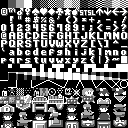
Another graphical limitation in this project was the use of fixed-width ASCII characters. The articles have those border tiles because I wanted a rough indicator of the overscan areas when displayed on typical CRT monitors - I never bothered to remove them. I then had to add a one-tile margin on each side so the text wouldn’t touch these borders. The effective screen width was:
(32 columns) - (4 columns for borders) - (2 columns for margins) = 26 safe columns
…Yeah, that’s not a lot of horizontal space for Latin words, let alone sentences. I had to manually tweak the article wording and spacing countless times just so I could avoid awkward word-wrapping. The obvious solution to this is to actually take advantage of the rewritable CHR-RAM on the FDS and implement a proportional or variable-width font (VWF) for displaying articles. That would allow me to include significantly longer articles even within a vertical two-screen layout.
I also never got around to designing or implementing fancy screen transitions like scrolling and/or palette fading. Including those would’ve made the final product feel that much more polished.
Japanese Support
Japanese support has always been tricky on these 8-bit platforms due to the sheer number of kanji required in typical texts. (JIS X 0201 is ASCII + katakana but that is very hard to parse, even for native readers) The only feasible method to offer Japanese and English support on the same disk would be to have a language selection tied to disk loading for CHR data and article contents. Dynamic CHR-RAM plotting and attribute trickery for kanji/kana characters may also be required.
Closing Thoughts
Overall, I’m quite happy with the result. I think it could’ve used more visual polish but releasing the diskmag in time for the anniversary was more important to me. There’s a lot of things I could try out in future projects, too. I hope you enjoyed the diskmag and this dev log!
Next Time…
I suppose discovering sought-after cheat codes in an almost 30-year-old game is kind of a big deal for those in the know. Tune in next time for the unraveling of the ‘PLAY HARD’ mystery in Ken Griffey Jr.’s Winning Run for the SNES.
tags: devlog - Famicom - FDS - 6502 - assembly